Nano Banana Pro: Everything You Need to Know + 25 Example Use Cases
The world of AI image generation just changed forever.
Google has officially released its latest masterpiece called Nano Banana Pro.
You might know it by its technical name: Gemini 3 Pro Image, but everyone on the internet is calling it Nano Banana Pro.
If you love creating AI art, you need to try this tool immediately because it’s faster, smarter, and more powerful than anything we’ve seen before.
Today, I’m going to show you exactly what it is, how to use it, and give you 25 real-world use cases that actually matter.
Image Prompt 1: A sleek futuristic 3D render of a glowing neon yellow banana with digital circuit patterns, floating in a high-tech cybernetic laboratory environment, text “Nano Banana Pro” in holographic letters, dramatic blue and purple lighting, and photorealistic CGI quality
What Exactly Is Nano Banana Pro?
Nano Banana Pro is Google’s newest text-to-image AI model, released in November 2025.
It’s the successor to the original “Nano Banana” (Gemini 2.5 Flash) model, but the “Pro” version runs on the powerful Gemini 3 engine.
This means it understands your prompts much better than older modelsâit doesn’t just “guess” what you want, it uses reasoning to understand physics, lighting, and emotion.
This is a huge leap forward for AI creators because your pictures will look more realistic than ever, and the best part is the text rendering actually works.
Why Is Everyone Talking About It?
There are three massive reasons why this model is going viral right now.
First, it supports native 4K resolution, most AI generators upscale their images later, but Nano Banana Pro generates them in 4K right from the start, which means your details are sharp and crisp.
Second, it has perfect text rendering, where you can ask it to write long sentences on signs or poster,s and it will actually spell the words correctly, something Midjourney and DALL-E have struggled with for years.
Third, it’s incredibly fast and can generate these 4K images in under 10 seconds, which is lightning fast for such high quality.
How to Use Nano Banana Pro
Using this new model is actually very simple and accessible right now.
It’s available in the Gemini Advanced app and rolling out to Google Workspace tools like Slides and Vids.
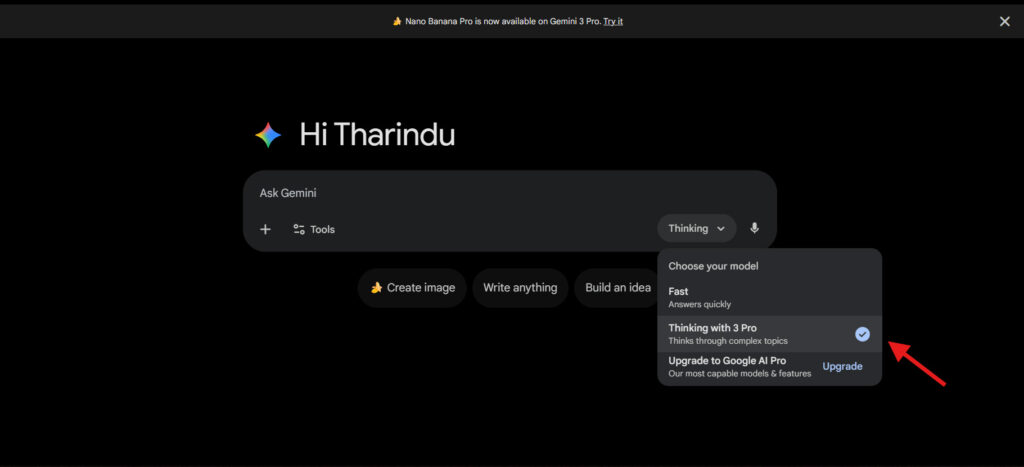
To get started, you just need a Google account, open Gemini, and make sure you’re on the “Pro” tab with the “Thinking” model selected.
Then simply type your prompt, and because this model is smart, you can talk to it like a human without needing complex technical language.
Just a heads-up: if you want to use Nano Banana Pro on AI Studio, youâll need a paid API key for higher limits
1. Professional Infographics
Nano Banana Pro is exceptionally sharp with both text and visual diagrams, making it perfect for turning complex information into professional-looking infographics.
When you ask it to create an infographic, it understands how to organize information hierarchically, add proper spacing, use colors effectively for data visualization, and make everything readable at a glance.
Try this prompt:
Create a modern infographic about 8 essential habits for staying safe online, include icons for each habit, use a tech-inspired blue and black color palette, add statistics and brief explanations under each habit, professional layout suitable for an Instagram post.

The model can also research and include accurate data points with proper citations and labels.
2. Image Annotation & Labeling
Sometimes you have a photo and need to label parts of it for tutorials, educational content, or product explanations.
Nano Banana Pro can add clean, readable annotations directly to your photos without cluttering the original image.
Try this prompt:
Add clear annotations to this food photo, labeling all visible ingredients with clean text labels and leader lines in a professional food-photography style.
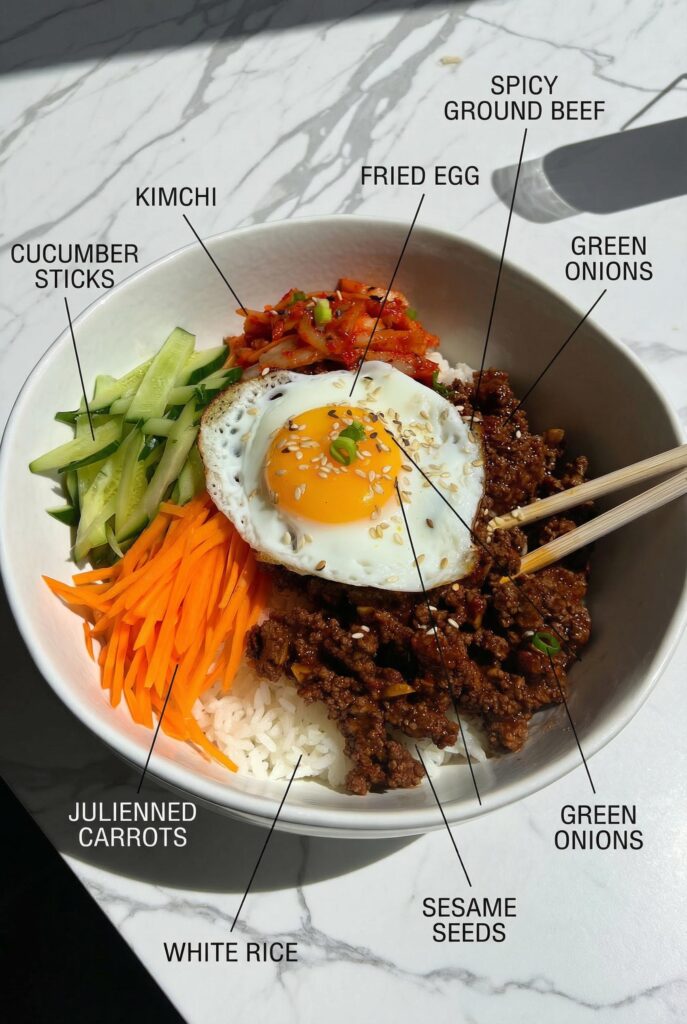
Upload your image and ask it to label, identify, or add explanatory text to specific parts with professional precision.
3. Comic Strip Creation
Creating comics used to require drawing skills and hours of work, but now you can generate entire comic strips because Nano Banana Pro excels at both drawing panels and understanding visual storytelling.
The model understands narrative flow and can keep your character consistent across multiple panels, which is crucial for actual usable comics.
Try this prompt:
Create a four-panel vertical comic strip.
Panel 1: A cute Japanese girl searches her room, looking worried as she canât find her cat anywhere.
Panel 2: She pauses with her hand on her chin, thinking deeply, her eyes big and sparkly, trying to remember where her cat might be.
Panel 3: She has a dramatic yet adorable lightbulb moment and rushes toward the closet with excitement.
Panel 4: She opens the closet to find her cat curled up inside a box, and she smiles with huge relief and affection. Keep the character consistently styled as a cute anime-inspired Japanese girl, using a soft and charming comic art style.
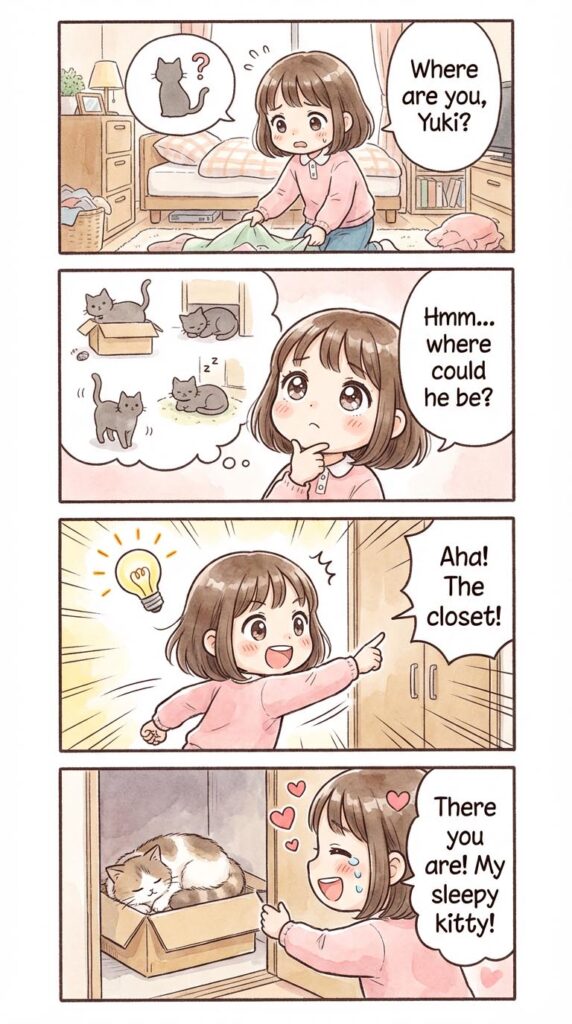
Each panel flows naturally into the next with appropriate expressions and visual continuity.
4. Camera Angle Transformation
Have a photo that would look better from a completely different perspective or angle?
Nano Banana Pro can intelligently change the camera viewpoint while maintaining the subject and scene integrity.
Try this prompt:
Create a cinematic poster visually explaining the 12 most common camera angles in filmmaking, bird’s eye view, high angle, eye level, low angle, Dutch angle, over-the-shoulder, point of view, aerial shot, close-up, medium shot, long shot, extreme close-up: with clear text labels for each angle, realistic examples, film school educational style.
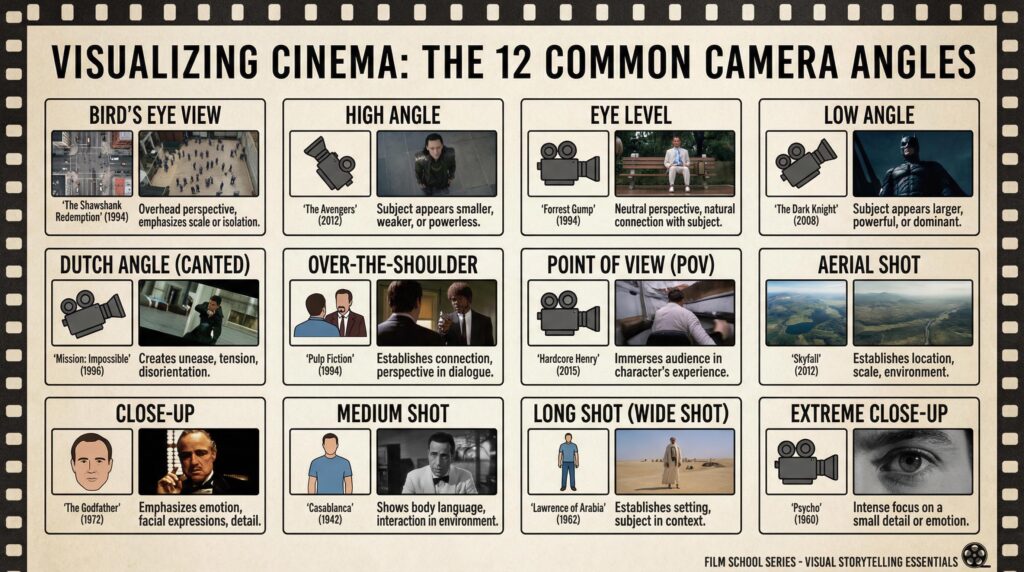
The model understands spatial relationships and 3D positioning, so it can reframe your image from new angles that weren’t in the original photo.
5. Aspect Ratio Adjustment
You have a perfect photo, but it needs to fit a specific platform format: square for Instagram feed, vertical for Stories, or wide for YouTube thumbnails.
Upload your photo and ask Nano Banana Pro to change the aspect ratio to whatever you need, and here’s the key difference: it doesn’t just stretch or awkwardly crop your image.
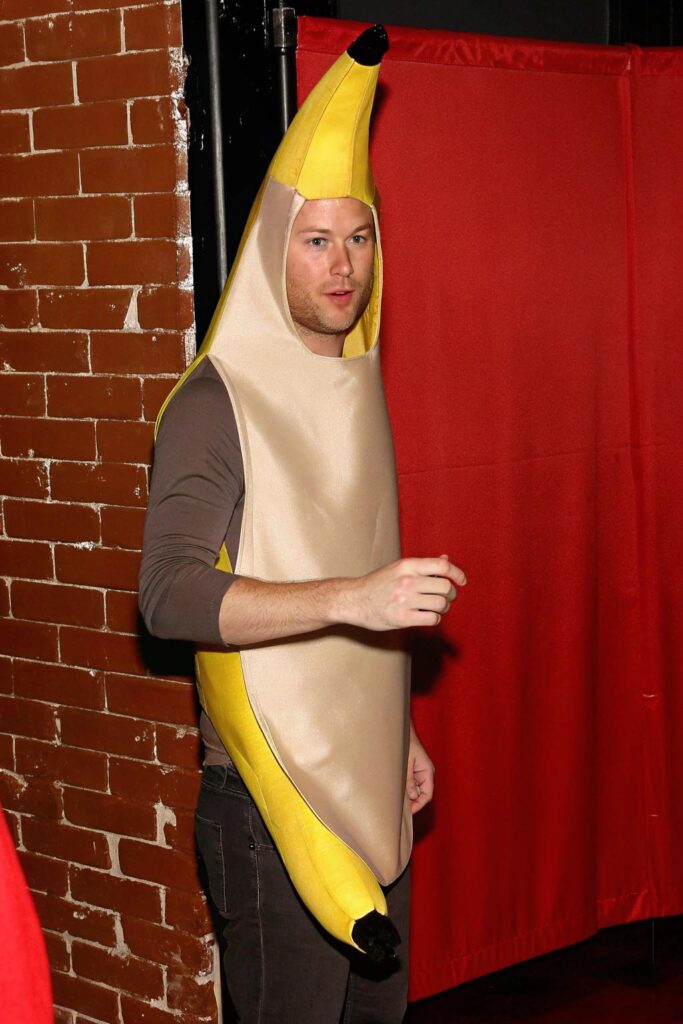
Try this prompt:
Take this portrait photo and change aspect ratio to 16:9 for YouTube thumbnail, intelligently extend the background on both sides maintaining the person centered, keep original lighting and atmosphere consistent, no distortion or stretching, seamless expansion.
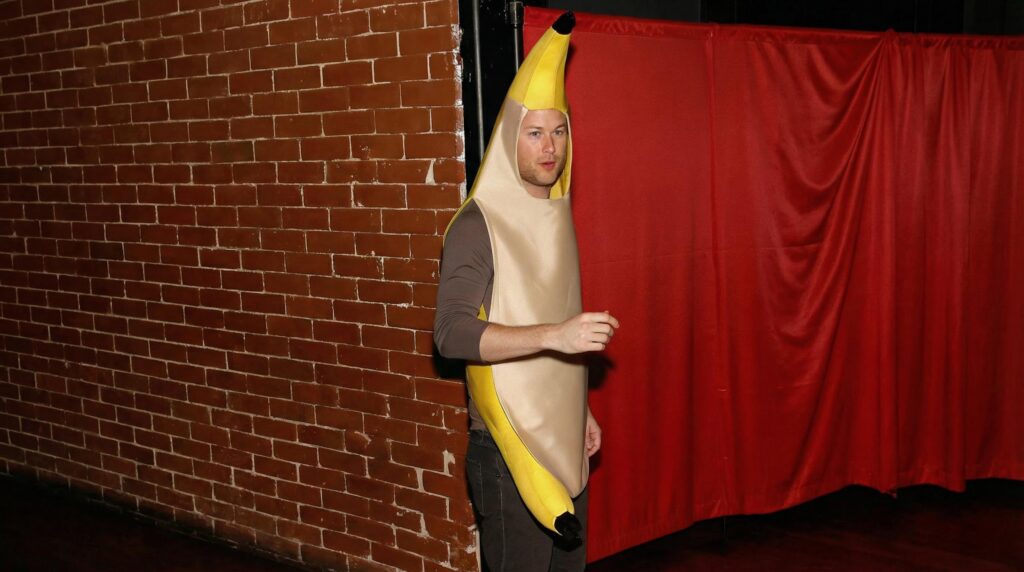
When you ask for a wider or taller ratio, it intelligently fills the new space with contextually appropriate content that matches the original scene seamlessly.
6. Sketch to Photorealistic
You have a rough idea sketched on paper or a simple drawing, but you want to see what it would actually look like as a realistic photograph.
Upload any sketch to Nano Banana Pro and ask it to transform it into a photorealistic image with proper lighting, textures, materials, and atmospheric details.
Try this prompt:
Transform this house blueprint sketch into a photorealistic architectural photogr