
20 Gemini Nano Banana Photo Editing Prompts: Real Examples That Actually Work
If you’ve ever stared at a photo thinking “this is almost there, but something’s off”…
You know that feeling, right?
You’ve got the shot. The lighting is decent. The subject looks good. But something about the edit just isn’t clicking.
Here’s what I discovered: having the right photo editing prompt makes all the difference.
Instead of guessing what adjustments to make, you can describe exactly what you want. And Gemini Nano Banana actually listens.
It’s not magic. It’s just clarity.
When you give Gemini clear instructions, it handles the technical stuff while you focus on the creative vision. That’s the whole point of these prompts.
I’ve tested a bunch of them. Some work beautifully. Some need tweaking. Some surprised me with how good they are.
This article shares 20 prompts I actually use, ones that work for portraits, products, and creative edits. Each one has a real example so you can see what happens.
You can copy them exactly or adjust them for your photos. Either way, they’ll save you time.
Let’s dive into these Gemini nano banana photo editing prompts!
Why Gemini Nano Banana Works for Photo Editing
Gemini Nano Banana understands photography language in a way that feels natural.
You can talk about color temperature, skin tones, shadow depth, texture preservation, and it actually gets what you mean.
Unlike basic filters that apply the same effect to everything, Gemini reads your specific instructions and adapts to your photo.
Describe what matters (maybe it’s the eyes in a portrait, or the product shine in a product shot) and it focuses there. Everything else stays balanced.
The real power? It handles subtle edits beautifully.
You don’t get heavy-handed results. You get refined edits that look intentional, not overdone.
Read The Full Article Here – Nano Banana Pro: Everything You Need to Know
How to Write Prompts That Actually Work
The best prompts are simple and direct.
Seriously. You don’t need to write a paragraph.
Here’s what works:
- Say what you want to fix or enhance (skin, lighting, color, background).
- Be specific about the intensity (subtle, moderate, strong).
- Mention what should stay untouched (eye sharpness, skin texture, original colors).
- Add one clear goal per prompt.
That’s it.
For example: “Warm the skin tone slightly, brighten eyes while keeping detail sharp, remove tiny blemishes but keep texture natural.”
Clear. Specific. One goal at a time.
When you write like this, Gemini delivers consistent results instead of guessing what you want.
15 Gemini Nano Banana Photo Editing Prompts
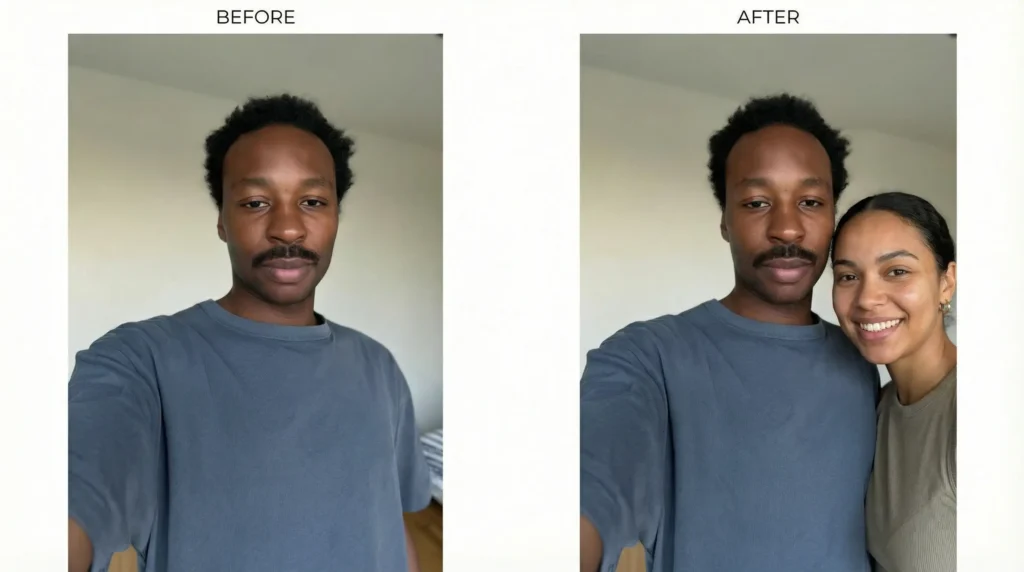
1. Add People to Photos
What it does: Adds a person to a single-person photo. Add a girlfriend to a solo selfie. Add friends to a group. Creates the photo you wish you had.
A guy’s solo selfie now has a girlfriend beside him, looking happy and natural. She’s positioned naturally. The lighting matches his face. They both look like they belong in the same photo.
The prompt:
“Add a woman standing beside the person in the selfie, make her look happy and natural, ensure her lighting and shadows match the original, position her naturally, keep her features diverse and realistic.”
2. Change Facial Expressions
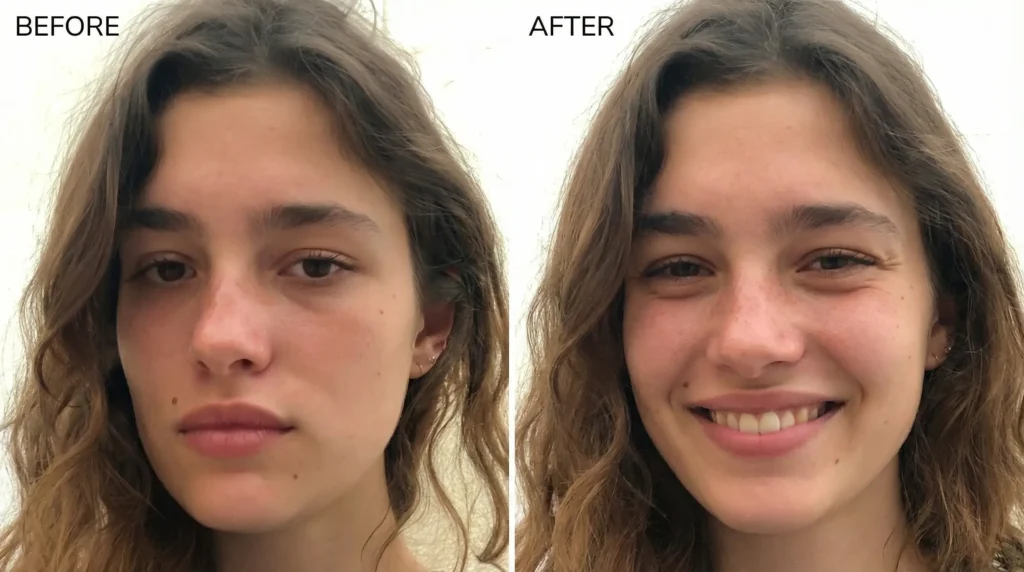
What it does: Shifts emotions. A sad face becomes happy. A serious look becomes playful. Changes the entire mood of the photo.
A woman in the original photo looks sad or upset. After the edit, her expression is genuinely happy. Her smile is natural. Her eyes light up. The entire feeling of the photo transforms.
The prompt:
“Change the facial expression from sad to genuinely happy, create a natural smile, brighten the eyes to show happiness, keep all facial features natural and recognizable, maintain skin tone and lighting.”
3. Change Clothing or Outfit
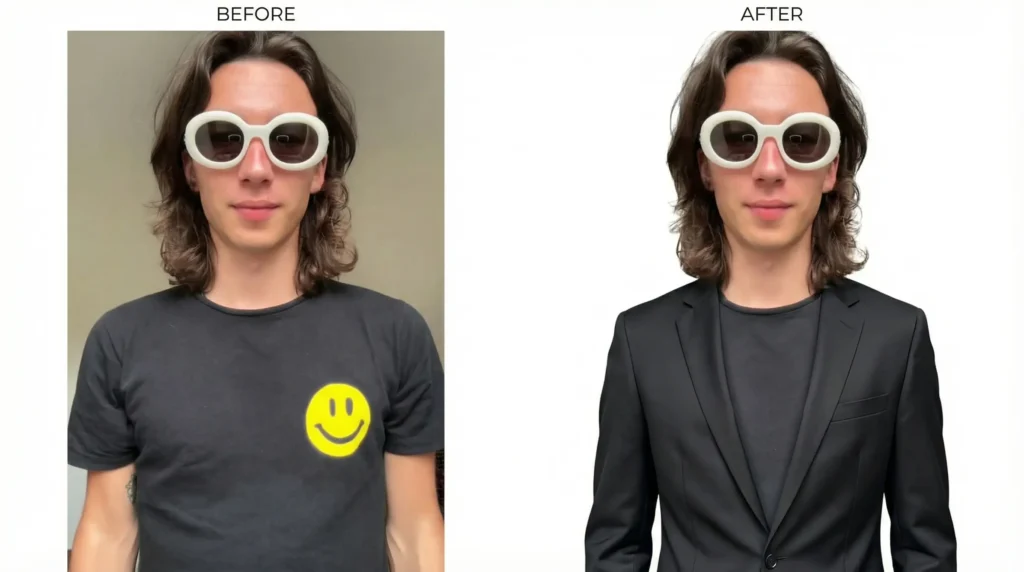
What it does: Swaps out what someone is wearing. Change a casual shirt to a formal blazer. Swap jeans for a dress. Total outfit transformation.
Someone in a t-shirt is now wearing a professional blazer instead. The fit looks tailored. The color matches the lighting. The change looks intentional and realistic, not pasted on.
The prompt:
“Change the shirt to a professional blazer, match the fit and tailoring to the body, ensure the color coordinates with the lighting, keep the rest of the body and pose unchanged, make it look like they’re actually wearing it.”
4. Change Objects in the Scene
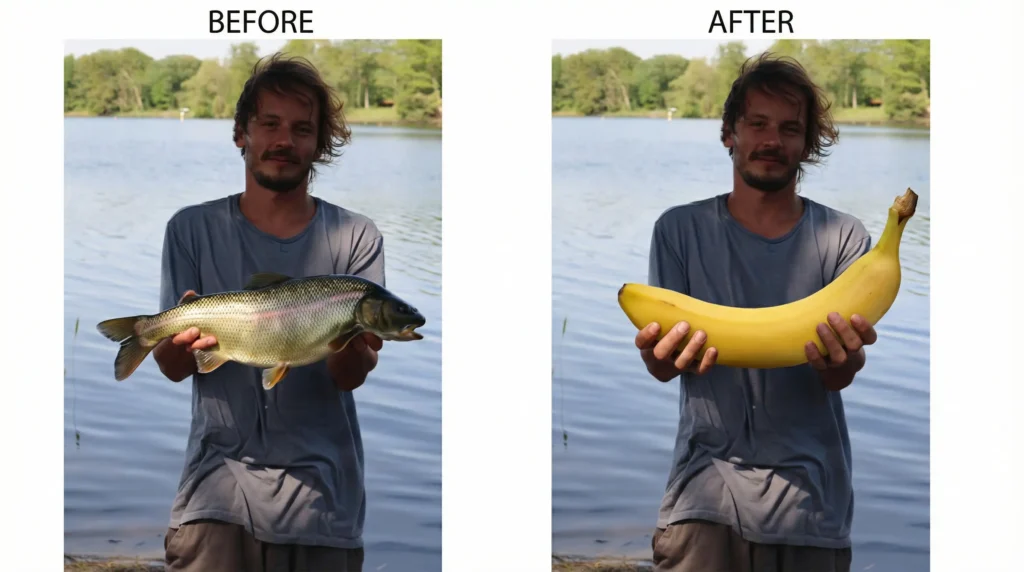
What it does: Swaps one object for another. A fish becomes a banana. A phone becomes a book. Total transformation without starting over.
A guy holding a large fish at a lake now holds a giant banana instead. The size and positioning stay the same. The banana looks real and fits the scene. It’s hilarious and seamless.
The prompt:
“Replace the fish the person is holding with a large banana, keep the same pose and positioning, make the banana look realistic and weighted properly, maintain all other elements unchanged.”
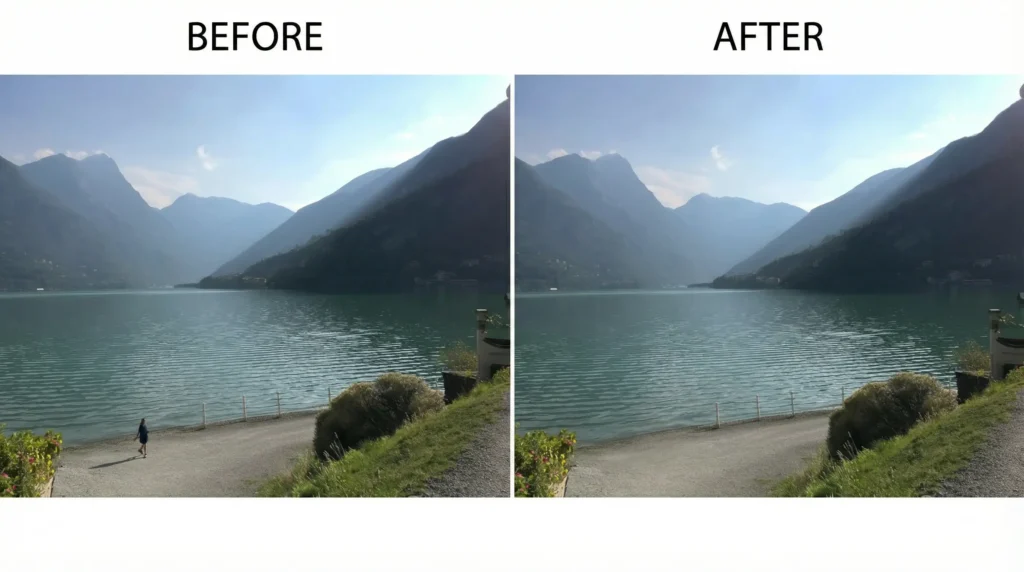
5. Remove People from Background
What it does: Erases people or objects from the background without affecting the subject or making it look obvious.
A beautiful landscape photo has a random tourist in the background. After the edit, the tourist is gone. The background looks natural and continuous. You’d never know someone was there.
The prompt:
“Remove the person in the background, fill the area naturally with landscape that matches surroundings, keep the main subject and foreground completely unchanged, ensure seamless blending.”
6. Change Hair Color or Style
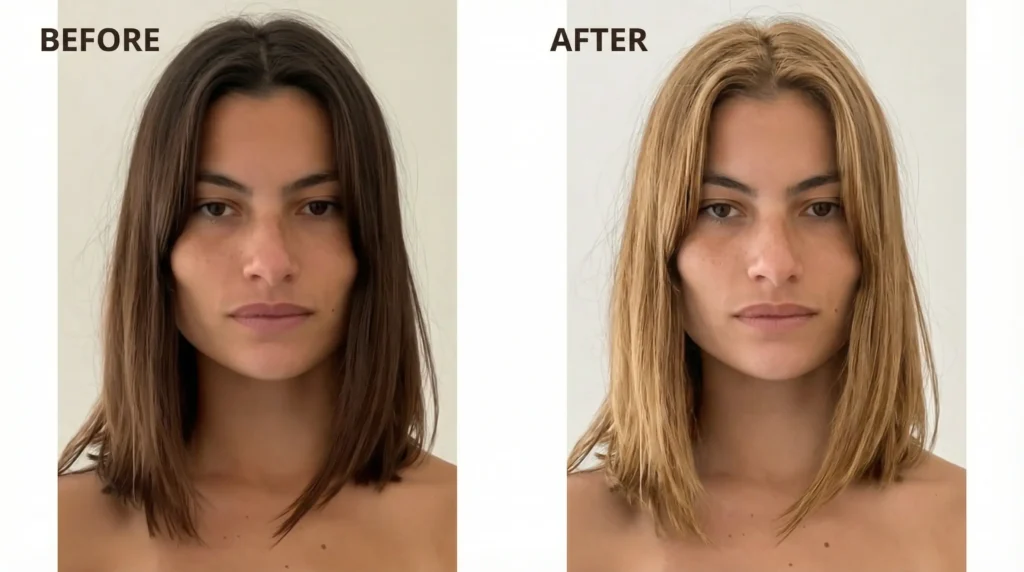
What it does: Changes hair color dramatically or even adjusts the style slightly. Blonde to brunette. Long to short vibes.
Someone with brown hair is now blonde. The color looks natural with the lighting. The tone matches their skin. Even the highlights and shadows shift to match the new hair color realistically.
The prompt:
“Change hair color from brown to blonde, adjust highlights and shadows to match the new color, keep skin tone appearance natural, ensure the color matches the photo’s lighting, maintain all hair texture.”
7. Warm Golden Hour Glow
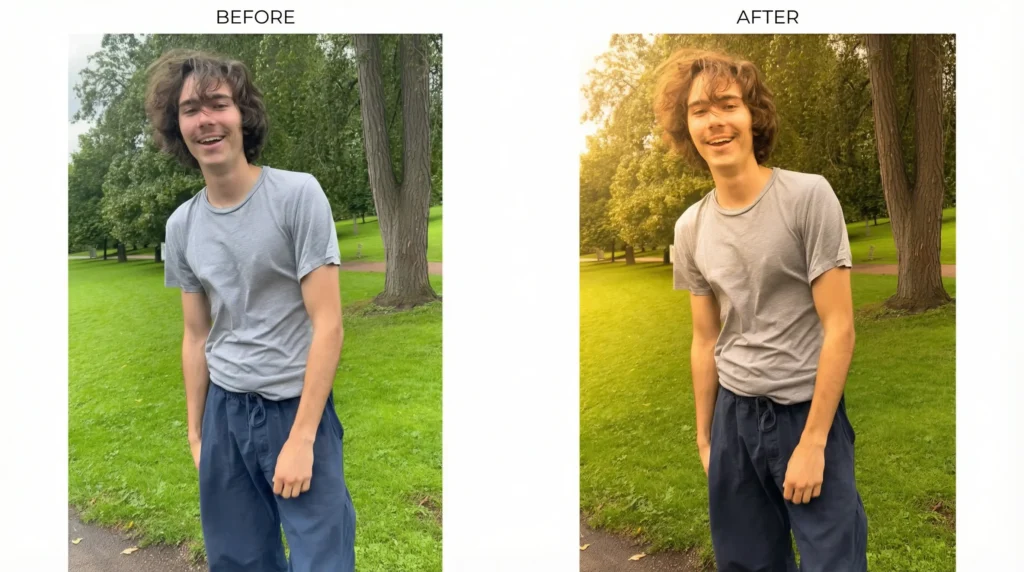
What it does: Adds that dreamy, warm light you get during golden hour. Works even if you didn’t shoot during golden hour.
A daytime portrait becomes warm and glowing. The light feels directional, like it’s coming from the side. Shadows soften. The whole mood shifts to peaceful and romantic.
The prompt:
“Add warm golden light from the left side, soften shadows gently, increase midtone warmth by 12%, keep highlights natural, maintain sharp focus on the face.”
8. Bring Distant People Together
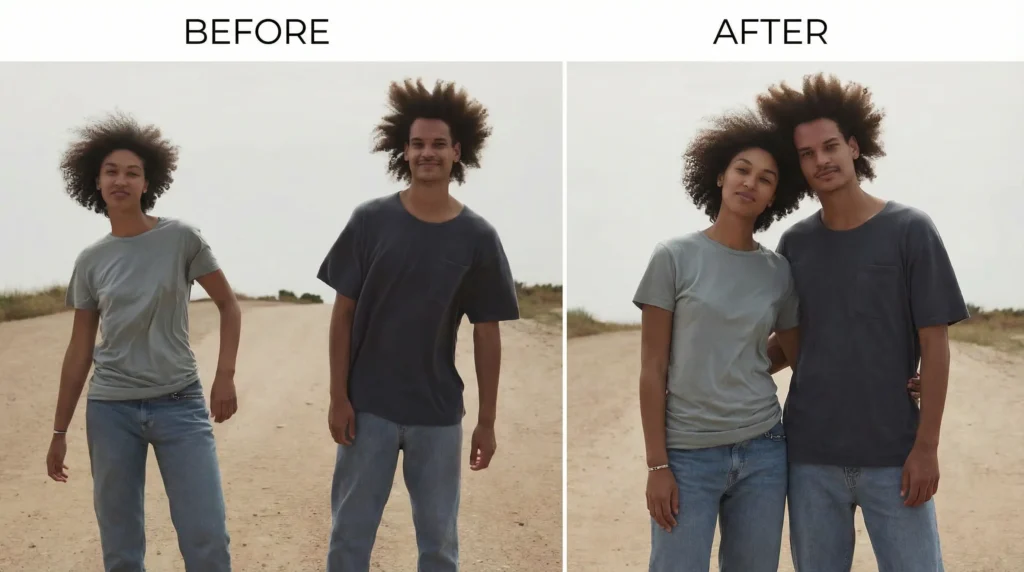
What it does: Merges two people from different parts of the photo into one connected shot. Perfect for making separate moments feel like one shared experience.
A couple standing far apart on opposite ends now stands close together in the center. She’s tucked under his arm. Their positioning flows naturally like they were always meant to be there together.
The space between them closes while keeping both their features and the background intact.
The prompt:
“Reposition both people to stand close together in the center of the frame, have them embrace or stand arm-in-arm naturally, adjust their body language to show connection and comfort, keep both faces and expressions natural, maintain background and lighting unchanged.”
9. Change Pose and Action
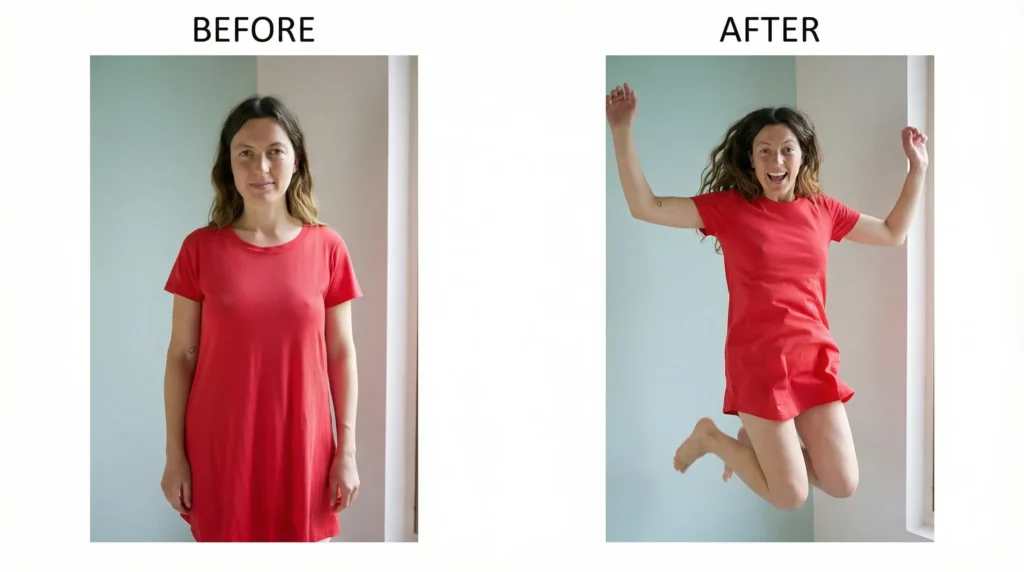
What it does: Transforms static poses into dynamic actions. Someone standing becomes jumping. Someone still becomes dancing. Makes boring photos look alive.
A person standing motionless is now captured mid-jump with energy and movement. Their hair and clothes move with the action. Their expression matches the movement. The same background, same lighting, but completely different energy and action happening.
The prompt:
“Change the person from standing still to mid-jump with arms raised, make their hair and clothes show movement, capture energy in their expression, keep the background and lighting exactly the same, maintain their identity and features.”
10. Cinematic Color Grading
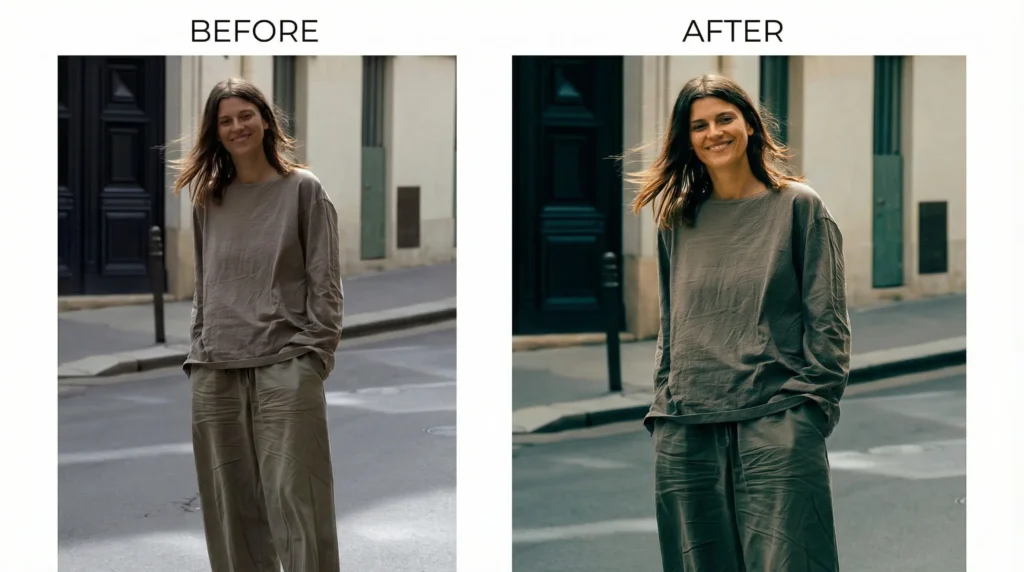
What it does: Gives your photo that moody, cinematic vibe. Great for lifestyle and mood shots.
The colors shift to slightly desaturated with a teal and orange tone. Shadows deepen. Highlights get a subtle warm cast. It looks like a movie still.
The prompt:
“Apply subtle cinematic color grading: slightly desaturate overall, add warmth to highlights, cool shadows slightly with teal undertone, increase contrast moderately, preserve subject color.”
11. Add or Change Background Scenery
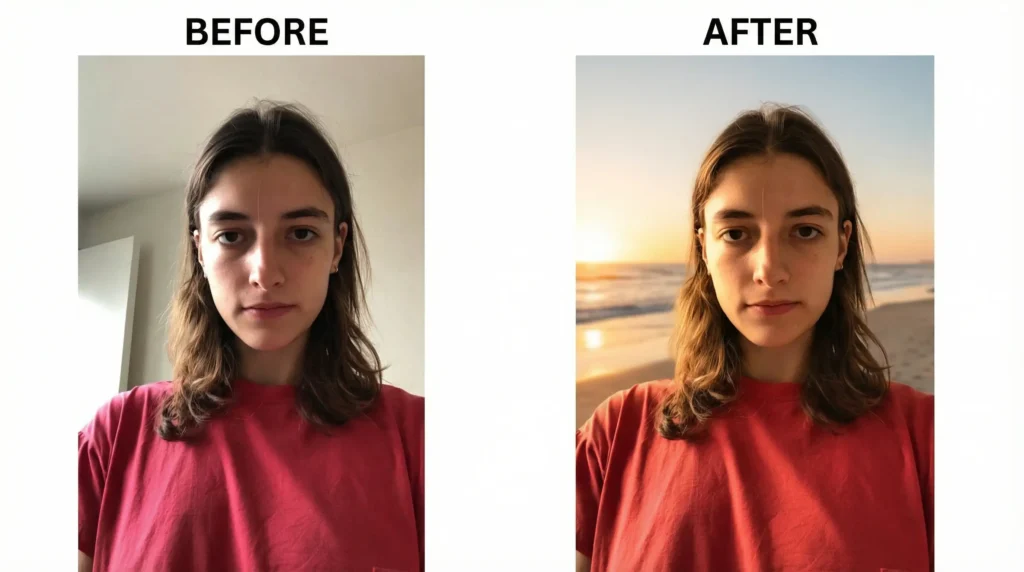
What it does:Â Swaps the background for something completely different. Beach backdrop becomes forest. The office becomes a sunset field.
Someone is standing in front of a boring wall. Now they’re in front of a beautiful sunset beach scene. The lighting on their face matches the golden hour background. They look like they were actually at the beach.
The prompt:
“Replace the background with a beautiful sunset beach scene, adjust the person’s lighting to match golden hour, ensure shadows fall naturally, keep the person’s position and pose unchanged, blend edges naturally.”
12 Clean Background Removal
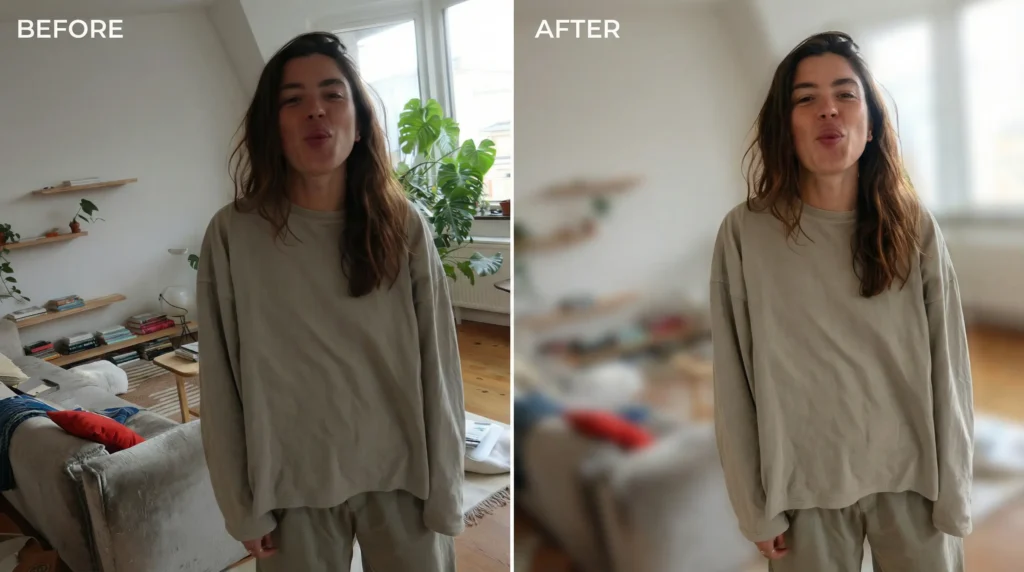
What it does: Removes distracting elements from the background. Useful when someone photobombs or clutter sneaks into the frame.
A messy background becomes clean. Distracting elements fade or disappear. The subject stays perfectly sharp. The background looks natural, not fake or blurred.
The prompt:
“Remove background distractions and clutter gently, blur background slightly if needed, keep subject completely sharp and detailed, maintain natural edge around the subject.”
13. Enhance Eye Details
What it does: Makes eyes pop. Sharpens them, adds subtle shine, makes them look more awake.
The eyes become sharper and more defined. There’s a gentle catchlight reflection. The iris color looks richer. The whole face feels more present.
The prompt:
“Sharpen eyes and iris detail, add subtle catchlight reflection, deepen iris color slightly, brighten whites of eyes gently, keep natural eye shape.”
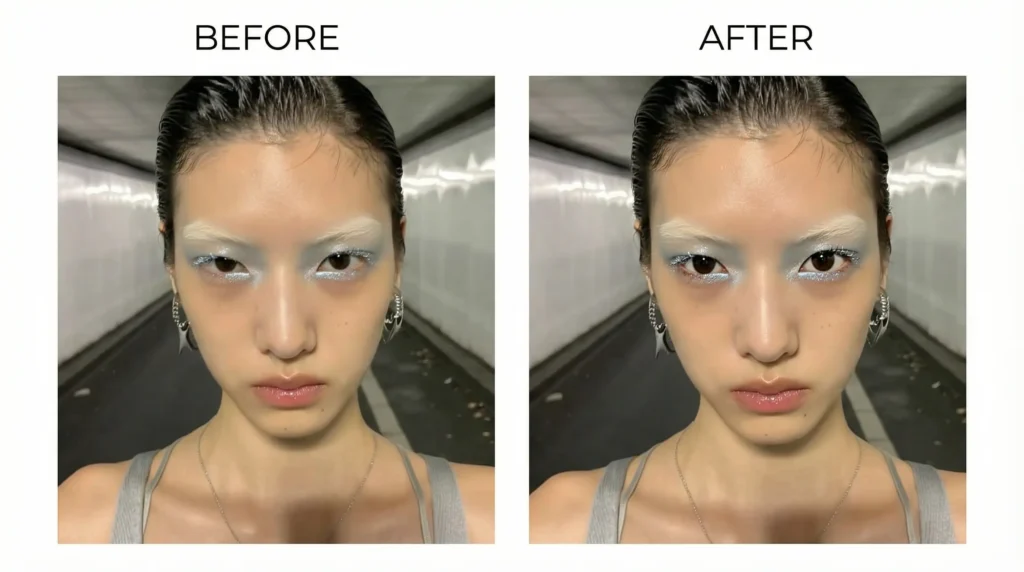
14. Glow-Up Makeup Enhancement
What it does: Makes makeup look professionally done without overdoing it. For beauty and glamour shots.
The makeup looks polished and intentional. Skin appears flawless but still textured. Lip color deepens slightly. Eyes look defined without looking heavy.
The prompt:
“Enhance makeup subtly: deepen lip color slightly, add glow to cheekbones, sharpen eye makeup definition, keep skin texture visible, avoid plastic appearance.”
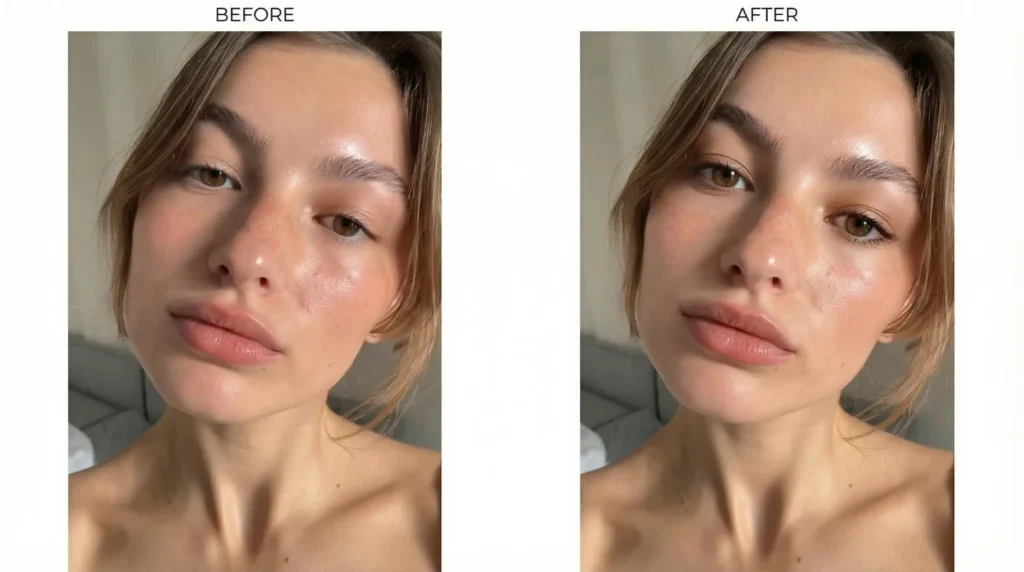
15. Fix Flat Indoor Lighting
What it does: Takes flat, boring indoor photos and gives them dimension and depth.
The photo goes from dull to dynamic. Light an